Most AI writing tools work on one promise: whatever it does, you can undo. That holds right up until you notice, three edits later, that a paragraph you liked is gone and the undo history no longer reaches it.
The weak point is not undo. It is noticing. An assistant that adds a section makes a change you will see. One that quietly trims a sentence makes a change you may never see. The assistant in every LumenQube editor treats those as different kinds of change. Here is how that works, and where it stops.
Three kinds of change, three levels of risk
Every change an assistant can make falls into one of three groups, and each has its own rule:
- Adding — new text, a new slide, a new row. It goes ahead, and one undo removes it.
- Removing or replacing what was there before you asked. By default it is held on a card until you decide. A removal you asked for in words goes ahead.
- Changing what is already there. By default the assistant changes only what your request is about, and holds anything else for your OK.
The middle one is the expensive one. A deleted paragraph is invisible by definition: nothing on the page points to where it was. So that is where LumenQube spends your attention.
Why not ask about everything?
An assistant that asks permission for every comma is not careful; it is noisy. People learn to approve cards without reading them, and the one card that mattered gets the same reflex. So the rule is narrow on purpose. Additions go ahead because you can see them and undo them. Removals and replacements wait because they leave nothing on the page to notice. Changes outside your request wait because you did not ask for them.
A removal, held
- You ask the Docs assistant to tighten a brief to one page.
- What it adds lands straight away — new text is easy to undo.
- Three paragraphs it wants to remove are held, not removed.
- The card lists each one. Nothing is removed yet.
- You untick the paragraph you want to keep.
- Two paragraphs go. The one you kept stays where it was.
- The whole decision is one undo step.
The card
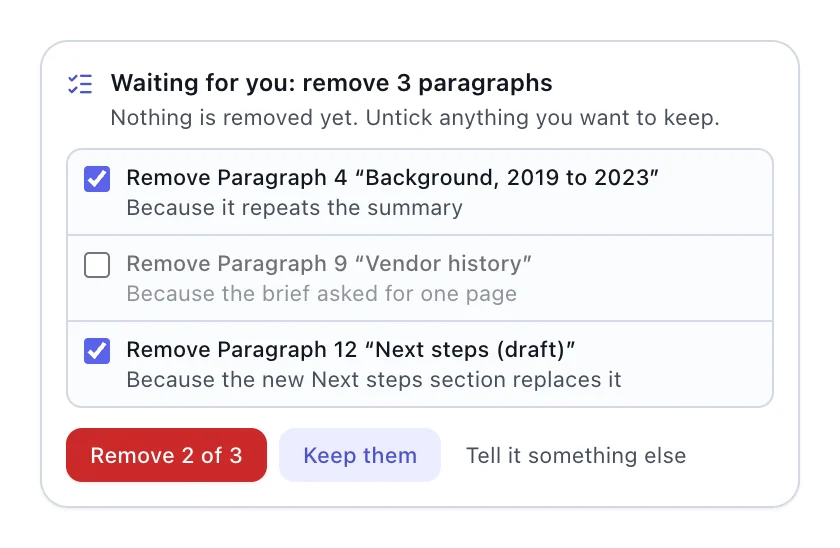
The card arrives under the assistant’s reply and reads, in full: “Waiting for you: remove 3 paragraphs. Nothing is removed yet. Untick anything you want to keep.” Each row names the paragraph and the assistant’s reason. The button counts what you left ticked — Remove 2 of 3. Keep them discards the whole set. Tell it something else puts you back in the composer to redirect it.
Say you asked for one page, and it proposes cutting Background, Vendor history and a draft Next steps. You know Vendor history is the part your client always asks about, so you untick it. Two paragraphs go, one stays, and the brief is still under a page.
Two details matter. Deciding makes no new AI call: the change was already worked out, so applying it is local and immediate. And if you edited one of those paragraphs while the card was open, your edit wins — the held change leaves it alone.
When the AI wants another go
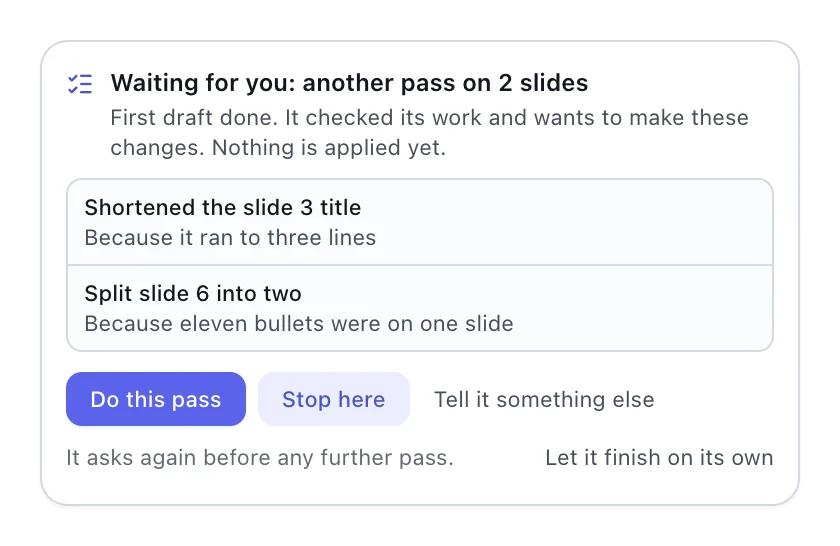
Good assistants check their own work, and sometimes want a second pass: shorten that title, split this slide. Each pass after the first draft is held on the same kind of card — “First draft done. It checked its work and wants to make these changes.” — with Do this pass and Stop here. Say yes and it asks again before any further pass; if you trust it on this document, Let it finish on its own. Each pass is its own card, so you always know which round you are on.
The settings behind it
- Removing or replacing your content: Ask first holds it on a card. A removal you asked for in words goes ahead.
- More passes after the first draft: Ask first checks with you before the AI refines its own work again.
- Changing what’s already there: When I ask for it changes only what your request is about.
- Full Auto lets everything through. The reasons in the chat and undo still apply.
These live in Settings › AI › Changes to your content and apply to every editor’s assistant. You loosen them; you never have to tighten them first. A related switch sits nearby: with LumenAgent edits as suggestions turned on, the agent’s edits to a document you have open in Docs arrive as suggestions to accept or reject, one by one or with Accept all.
What consent does not cover
Holding a change is not the same as being able to reverse every action. Inside the editors, a decided change is one undo step, and Sheets can revert one group of changes on its own; elsewhere, undo works on a whole run. Beyond the editors the rules are LumenAgent’s: sending, sharing and deleting wait on approval cards, because a sent email cannot be unsent. One request, three files walks through those.
Nor does a card judge quality: a held change is one the assistant believes is right, and the card is where you get to disagree. Consent also covers removals, rewrites and passes — not which files the AI may read in the first place. That is a separate control, and so is what happens to a file on its way back out: Open the spreadsheet. Work on it. Hand it back.
Questions about AI changes
Can I turn the cards off?
Yes. Each of the three settings can be loosened, and Full Auto stops holding anything. The assistant still explains what it did in the chat, and undo still applies.
Does it work the same in every editor?
The holding rules do. How far undo reaches differs: Docs also lets you accept or reject suggestions, Sheets can revert one group of changes, and other editors undo a whole run.


